
Project Orion: The Practical Player Guide
What is Project Orion?
Project Orion is OGame’s deep-space exploration and anomaly combat feature. It provides an entirely new avenue to generate massive resource caches, expand your fleet with free warships, and power up your Lifeform progression.
The Core Orion Gameplay Loop
The entire Orion system revolves around an automated economic cycle:

The Anomaly Schema
Orion operates on a continuous 4-phase economic cycle. Select any phase below to inspect the mechanics, pre-flight checks, and payout rules:
IAS Planet Scanners
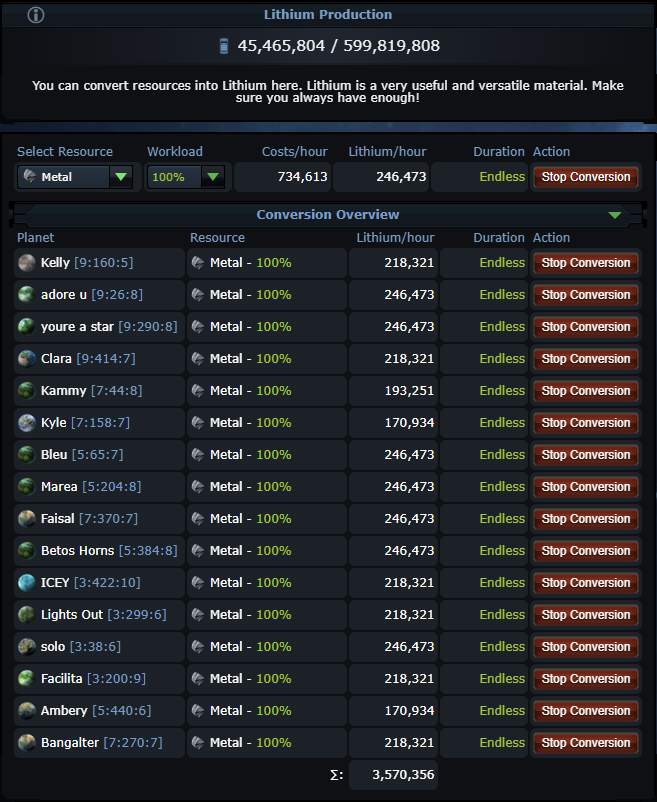
Interstellar Anomaly Scanners on all planets passively produce Lithium into one shared account pool. Higher levels unlock higher anomaly mission tiers.
Control Centre Facilities
Seven colony buildings stack across your entire empire (+0.2% per level everywhere), giving account-wide bonuses to Metal, Crystal, Deut, and ship recovery.
Mechan Tech 18 (General Boost)
Tier 18 Mechan Lifeform Tech (General Enhancement) heavily scales your General class bonus, pushing PvP sector multipliers from 4.0x up to 5.0x.
Scan Range vs Lithium Cost
Higher scan levels and wider search ranges cost more Lithium, but reveal top-tier anomalies like S+ Chaos (32.0x) and S Flagships (20.0x).
High Roll vs Low Roll
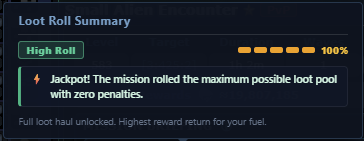
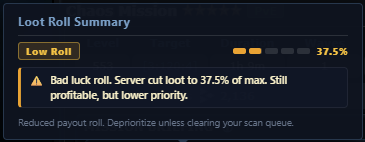
Green High Rolls pay 100% full budget. Yellow Low Rolls carry a harsh -62.5% penalty. Safe Delivery missions never roll low-roll penalties.
Sector Threat (PvE vs PvP)
PvE sectors are 100% safe from players. PvP sectors pay 2x to 4x more loot, but any real player in the galaxy can intercept your fleet.
Delivery: Total Cargo Rule
Deliveries have zero enemy defenders. Your only job is packing enough Small or Large Cargos to exceed every wave's demand. Under-packing loses loot!
Combat: Ships Do NOT Heal
Multi-wave combat fights (1 to 10 waves) carry battle damage from wave to wave. Early losses stay lost. Always simulate all waves with Nexus for 0 casualties.
Screen Defense & Zero Debris
Cruisers quickly shred light fighter screens and light turrets. Crucially, anomaly battles leave zero space debris for recyclers to collect.
Bank Secured Loot
Metal, Crystal, Deuterium, Lifeform Artifacts, and Species XP are deposited safely into your account when you claim completed wave rewards.
Fleet Finds (Free Warships)
Free ships awarded by missions return home with your fleet. Nexus calculates their 75% shipyard structural value in MSU and adds it straight into your profit.
Reinvest into Facilities
Reinvest earnings into Control Centre facilities across all colonies. Every level grants +0.2% permanently boosting every future mission you run!
Lithium: The Fuel of Orion
Lithium is the universal currency that powers every action in Project Orion. Understanding how it accumulates and scales is fundamental to running high-profit missions.

Interstellar Anomaly Scanner (Facility Building)
Primary Planet Surface FacilityThe Interstellar Anomaly Scanner serves a dual strategic role: it continuously fuels your account-wide Lithium generation while directly unlocking higher Anomaly mission tiers across your empire.
| Scanner Level | 1x Standard Eco | 10x Speed Eco | Unlocked Tier | Multiplier vs Level 1 |
|---|---|---|---|---|
| Level 1 | 16 / hr (384/d) | 168 / hr (4,032/d) | Anomaly Lvl 1 | 1.0x (Baseline) |
| Level 5 | 123 / hr (2.9k/d) | 1,236 / hr (29.6k/d) | Anomaly Lvl 5 | 7.3x baseline |
| Level 10 | 398 / hr (9.5k/d) | 3,983 / hr (95.6k/d) | Anomaly Lvl 10 | 23.6x baseline |
| Level 15 | 962 / hr (23.1k/d) | 9,624 / hr (231k/d) | Anomaly Lvl 15 | 57.0x baseline |
| Level 20 | 2,066 / hr (49.6k/d) | 20,666 / hr (496k/d) | Anomaly Lvl 20 | 122x baseline |
| Level 30 | 8,040 / hr (193k/d) | 80,406 / hr (1.93M/d) | Anomaly Lvl 30 | 476x baseline |
| Level 36 | 17,093 / hr (410k/d) | 170,934 / hr (4.10M/d) | Anomaly Lvl 36 | 1,012x baseline |
| Level 40 | 27,807 / hr (667k/d) | 278,072 / hr (6.67M/d) | Anomaly Lvl 40 | 1,646x baseline |
| Level 45 | 50,381 / hr (1.21M/d) | 503,819 / hr (12.1M/d) | Anomaly Lvl 45 | 2,982x baseline |
| Level 50 | 90,156 / hr (2.16M/d) | 901,561 / hr (21.6M/d) | Anomaly Lvl 50 | 5,336x baseline |
The Control Centre: Empire-Wide Bonuses
Every planet has a dedicated Control Centre tab with 7 specialized facilities. The key power of these buildings is that their bonuses stack cumulatively across your entire empire.
| Building Name | Yield Bonus Per Level | Empire Impact |
|---|---|---|
Metal Recycling Unit
Colony Facility
|
+0.2% Metal | Increases the amount of Metal rewarded from completed missions. |

Crystal Finishing Station
Colony Facility
|
+0.2% Crystal | Increases the amount of Crystal rewarded from completed missions. |
High-Pressure Deuterium Tanks
Colony Facility
|
+0.2% Deuterium | Increases the amount of Deuterium rewarded from completed missions. |

Lithium Electrolysis Lab
Colony Facility
|
+0.2% Cashback Chance | Increases the chance of receiving a Lithium refund when claiming mission rewards. |

Intergalactic Recovery Centre
Colony Facility
|
+0.2% More Ships | Increases the number of free ships rewarded from completed missions. |

Anomaly Analysis Centre
Colony Facility
|
+0.2% Artifacts & XP | Increases the Lifeform Artifacts and Species XP rewarded from completed missions. |

Catalytic Convertor
Colony Facility
|
-0.05% Transformation Cost | Decreases the resource cost fee when converting planet resources into Lithium. |
Mission Types: Delivery vs. Combat
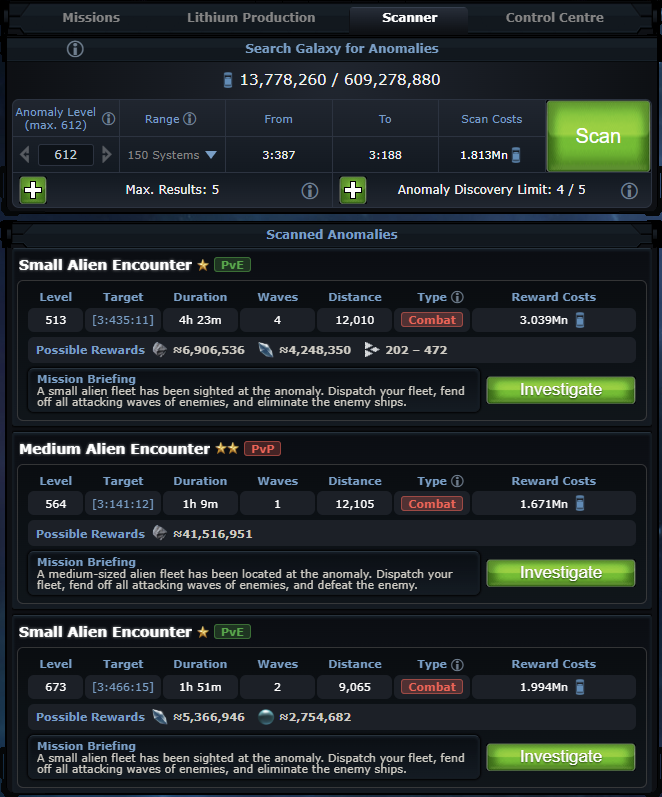
When your scanner completes a survey, it presents a list of available anomalies. Inspect your scan results, choose your mission type, and prepare your fleet:
1. Delivery Missions (Cargo Transport: 1 to 10 Waves)
Examples: Delivery: Metal, Delivery: Crystal, Delivery: Deuterium, Lost Deliveries.
-
✔
No Computer / Alien Enemies: You don't have to fight NPC defense fleets or turrets.
-
✔
Cargo Capacity: You simply need to send enough cargo ships (Small or Large Cargos) to have more cargo space than each of the NPC waves.
• PvE Deliveries: 100% safe. Other players cannot attack your fleet, and there is zero risk of losing ships.
• PvP Deliveries: Even though there are no computer enemies to fight, other real OGame players can intercept and attack your cargo fleet in flight or at the anomaly! If caught, unarmed haulers will be destroyed. In return for this danger, PvP deliveries pay out substantially higher loot.
2. Combat Missions (Multi-Wave Fights: 1 to 10 Waves)
Examples: Alien Encounters, Pirate Hideout, Chaos Mission, Special Merchant, Defend.
-
⚔
Wave-Based Fleet Battles: You dispatch combat warships to battle consecutive enemy defender waves (from 1 wave up to 10 waves). High-tier encounters like the Special Merchant (20.0x) also drop rare Premium Inventory Items (Kraken, Newtron, Detroid, and production boosters).
• PvE Combat: 100% safe from player attacks. Your fleet battles NPC defender fleets only; payouts are lower because there is zero interception risk.
• PvP Combat: Hostile players can attack your fleet while in transit or fighting! In exchange for taking on real player danger, PvP combat rewards are multiplied (2.0x for Discoverer/Collector, 4.0x+ for Generals).
3. Utility Missions
Examples: Lifeform Rescue, Lifeform Encounter.
These missions don't focus primarily on raw metal or crystal volume. Instead, they award massive bundles of Lifeform Artifacts (50 to 200+ artifacts) and thousands of Species XP to accelerate your Lifeform tree progression.
How to Evaluate & Dispatch Fleets
A simple walkthrough: evaluating if profits warrant the risk and Lithium cost, sizing your fleet, and timing your mission to bring loot safely home.
Decide if Profits Warrant the Risk and Lithium Cost
When your scan reveals anomalies, do not rush to click “Investigate” on every card. First, evaluate whether the expected profit actually justifies the Lithium cost and sector danger. Clicking “Investigate” creates the anomaly in the Galaxy where it can be seen by other players; the race is on!
Check the Sector Threat ([PvE] vs. [PvP])
Look at the badges at the top right of the briefing:
• [PvE]: Other players cannot attack your fleet. 100% safe.
• [PvP]: Real players can intercept you in flight or attack while stationed, but rewards are 2.0x to 4.0x+ higher.
Deliveries: Calculate Cargo Space Needed
Delivery missions have no enemy ships to fight. Your only job is hauling resources:
• The Golden Rule: Look at the cargo demand for each wave in the briefing. Your fleet must have more cargo space than each wave requires.
• Not having enough cargo space for a wave will cause you to lose rewards!
Combat: Size Your Fleet for All Consecutive Waves
In combat anomalies, you fight consecutive enemy waves in order (Wave 1 up to Wave 10):
• No Mid-Fight Repairs: In OGame anomalies, ships do not repair or regenerate shields between waves. Casualties in Wave 1 stay dead for Waves 2, 3, and beyond.
• Sizing Your Fleet: Over-prepare your fleet so you wipe each wave with 0 casualties.
Check Wave Arrival Timers
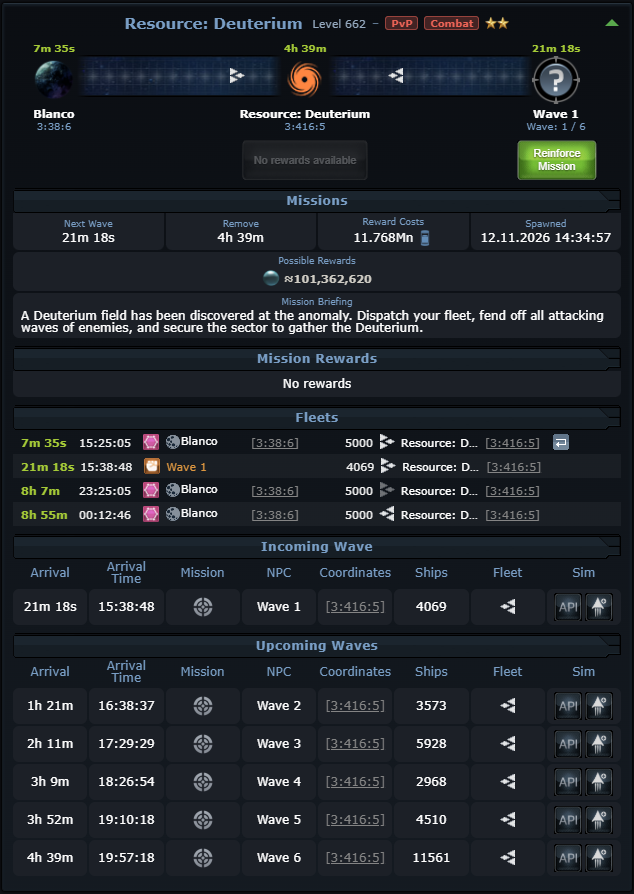
Look at the Arrival Time column under Incoming & Upcoming Waves (e.g. Wave 1 in 21m, Wave 2 in 1h 21m, Wave 6 in 4h 39m) or simply check the timer above the Anomaly symbol in the middle of the screen. Waves arrive in staggered intervals over several hours: this tells you exactly how long your mission will take.
Decide on Hold Time & Fetching Rewards
When launching from your fleet menu:
• Your fleet must remain stationed at the anomaly long enough to meet all the waves you want to beat.
• Set your Hold Time so your ships stay on station until the final wave arrives and is defeated. You can fetch your rewards after each completed wave or wait until the final wave is done.
Master Multiplier Table
Every anomaly archetype assigns an internal multiplier to the Lithium fuel spent. Use the search bar or category filters below to quickly check any mission:
| Tier | Mission Type | Multiplier | Category |
|---|---|---|---|
| S+ | Chaos Mission | 32.0x | Combat |
| S | Alien Flagship | 20.0x | Combat |
| S | Pirate Hideout / Ambush | 20.0x | Combat |
| S | Special Merchant | 20.0x | Combat |
| S | Alien Encounter | 18.0x | Combat |
| S | Small Pirate Encounter | 18.0x | Combat |
| S | Lost Deliveries | 14.0x | Delivery |
| S | Medium Pirate Encounter | 14.0x | Combat |
| A | Resource Deliveries (Met / Cry / Deut) | 13.0x | Delivery |
| A | Small Resource Delivery / Cloud Nebula | 13.0x | Delivery |
| A | Resource Combat Encounters | 13.0x | Combat |
| A | Small Alien Encounter | 12.0x | Combat |
| A | Valuable Delivery | 11.0x | Delivery |
| B | Rescue / Lost Wreckage | 10.0x | Combat |
| B | Defend | 9.0x | Combat |
| U | Lifeform Rescue & Discovery | 9.75x | Utility |
Reward Calculation Formulas
The game engine calculates mission payouts using a deterministic mathematical model. Knowing these factors lets you quickly identify the most profitable anomalies.
Player Class & Mechan Tech 18 Scaling
Your chosen player class fundamentally dictates your Orion payout ceiling:
| Player Class | PvE Multiplier | PvP Multiplier | Class Note |
|---|---|---|---|

Discoverer Class
Player Class
|
1.0x | 2.0x | Standard baseline. No anomaly class bonus. |

Collector Class
Player Class
|
1.0x | 2.0x | Standard baseline. No anomaly class bonus. |

General Class
Player Class
|
1.5x (+50%) | 4.0x (+100%) | Doubles the PvP payout of Discoverers and Collectors! |
Mechan Tech 18 (General Enhancement) Scaling
For Generals, researching your Tier-3 Mechan Lifeform Tech 18 directly amplifies your class bonus:
| Mechan Tech 18 Bonus | Effective PvE Multiplier | Effective PvP Multiplier | Real-World Advantage |
|---|---|---|---|

+0% (Base General)
Tier 18 Lifeform Tech
|
1.50x | 4.00x | Exactly 2.0x more PvP loot than Discoverer / Collector |
|
+10% Mechan Bonus
Tier 18 Lifeform Tech
|
1.55x | 4.20x | +5% more loot across both PvE and PvP |
|
+25% Mechan Bonus
Tier 18 Lifeform Tech
|
1.625x | 4.50x | PvP multiplier leaps to 4.50x (2.25x of Discoverer) |
|
+50% Mechan Bonus
Tier 18 Lifeform Tech
|
1.75x | 5.00x | Massive 5.00x PvP multiplier (2.5x of Discoverer) |
OGame Nexus Features
Standard OGame leaves you guessing: which mission gives the most loot, how many cargos to bring, and whether your fleet will survive all waves. OGame Nexus does the math right on your screen: ranking missions by profit, showing your real net gain, and simulating fights so you never lose ships.


Default Game vs. OGame Nexus
Here is a side-by-side look at the default game screens compared to the Nexus overlay:
1. Discovered Anomalies (Scanner Tab)
Pick the most profitable missions in seconds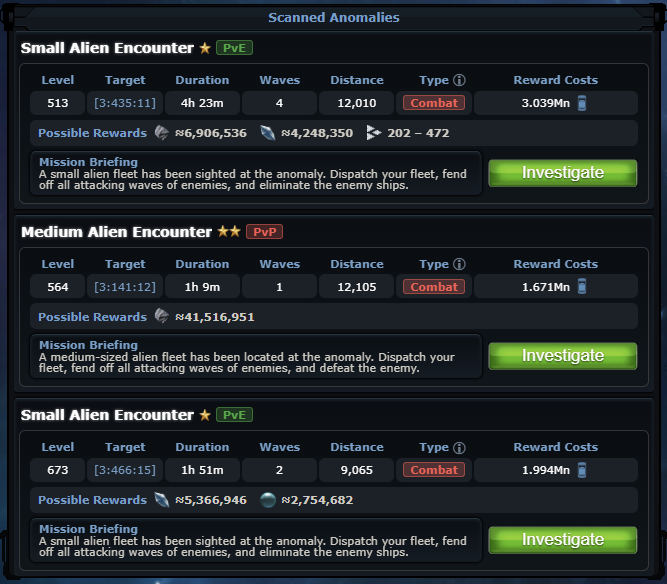
- Unranked Missions: No way to tell which mission pays the most per Lithium or per hour (MSU/h).
- Hidden Multipliers: Game hides class bonuses, PvP bonuses, and wave bonus values.
- No Calculated MSU Net Gain: You cannot see your real take-home loot (especially if the rewards include Random Ships).
- Blind RNG: No warning if a mission suffered a bad-luck reward penalty.
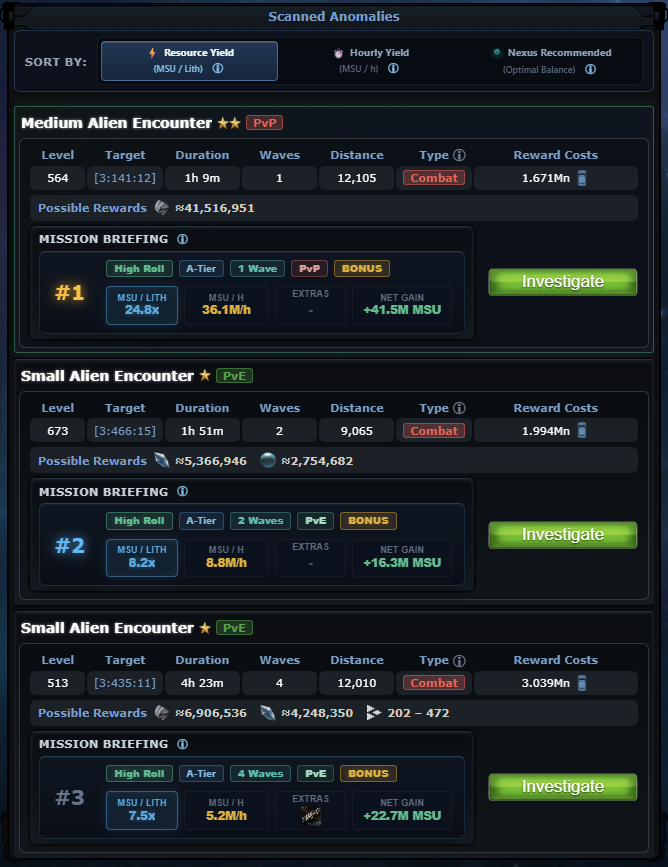
- Automatic Rankings: Badges missions as
#1,#2,#3based on MSU/Lithium and MSU/h efficiency. - MSU/LITH & Hourly Yield: Shows your exact return per Lithium spent and hourly profit, including exact values for Random Ships.
- Real Net Gain: Calculates your actual take-home resources with all colony building bonuses applied.
- Bad-Luck Alerts: Green High Roll (100%) or Yellow Low Roll (37.5%) badges warn you before you spend precious Lithium.
2. Mission Briefing & Waves
Know your cargo needs and win chance before launching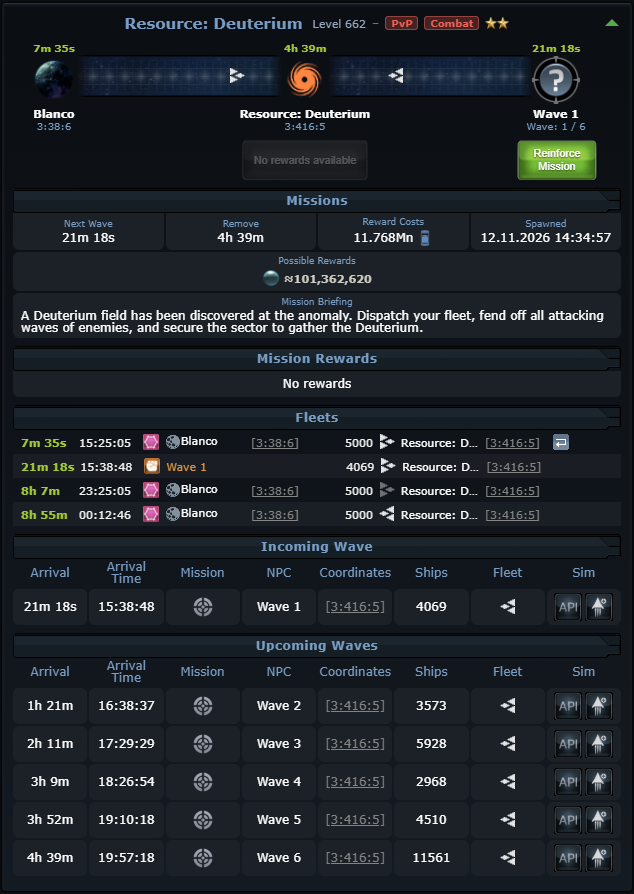
- Raw Wave Tables: Lists enemy ship counts, but doesn't calculate carryover battle damage.
- Cargo Guesswork: Doesn't tell you how many cargos you need to hold each wave's loot.
- No Total Summary: No clear view of total resource profit or overall mission time.
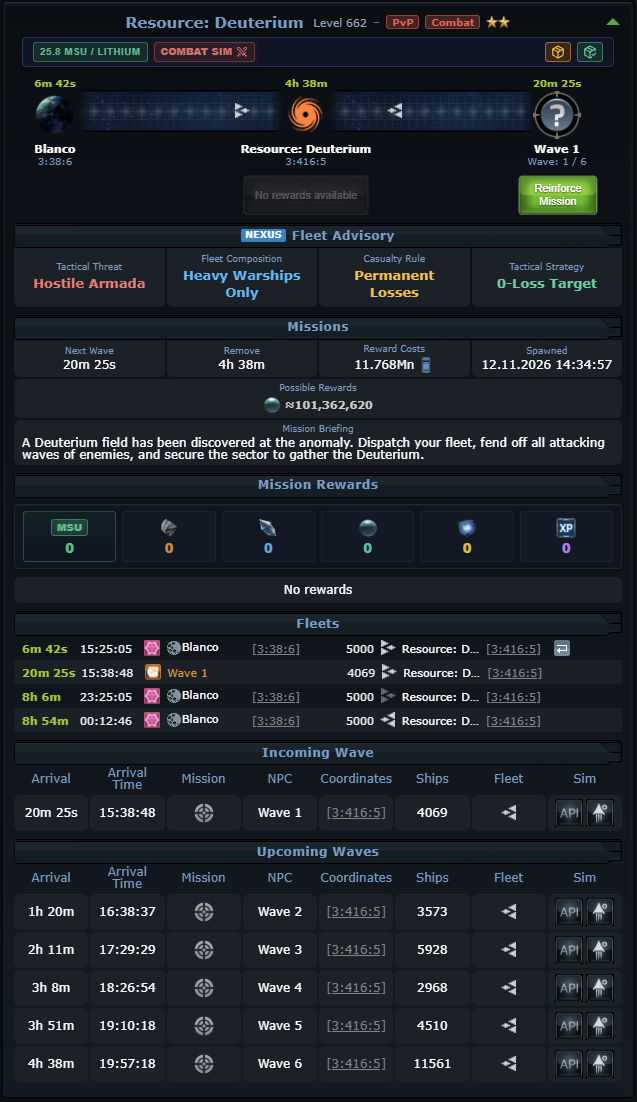
- Sector Profit Summary: Adds an info bar with your MSU/Lithium ratio, 1-click combat simulator or SC/LC cargo calculations, remaining reward pool, and so-far collected rewards.
- Exact Cargo Needed: Tells you precisely how many Small Cargos (SC) or Large Cargos (LC) to send so you don't leave loot behind.
- 1-Click Combat Simulator: Test all consecutive waves in the battle simulator before launching fleet.
Multi-Wave Battle Simulator (Fleet Optimizer)
In Orion, ships do NOT repair or regenerate shields between waves, and destroyed ships leave no debris field. If you lose ships, they're gone for good. Nexus lets you test your battle before launching:
Badges on Your Scanner Cards
Nexus puts simple color-coded badges on every mission card so you know key details at a glance:
High Roll vs. Low Roll Warning
Best Mission Highlighting (#1 Rank)
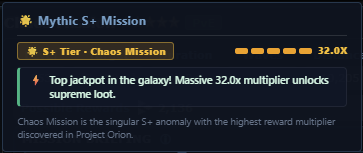
#1 badge shows you the single best mission on your board so you can launch right away.
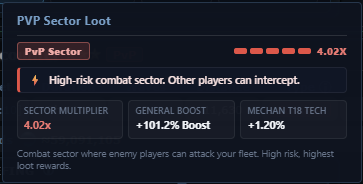
PvP Warning & General Class Boost
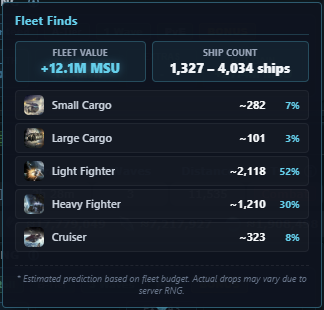
Fleet Finds MSU
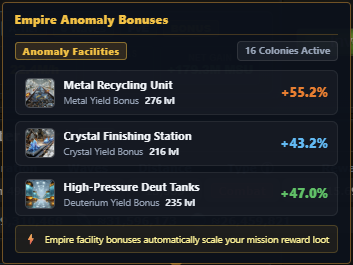
Anomaly Bonus Breakdown
Live Loot Tracking & Claim History
Keep an eye on your loot as your fleet completes waves, so you can decide whether to recall early or stay for the rest:
Remaining Sector Loot
Updates after every wave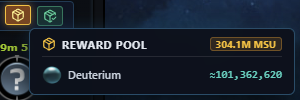
Secured Loot Log
Loot already packed in cargo holds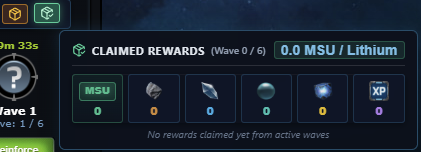
Nexus Anomalies Tracker (Dashboard Menu)
While you play, OGame Nexus quietly records your anomaly runs and wave receipts in your browser's private database. Open the Nexus Dashboard anytime to see your total earnings, track your empire bonuses, and review past missions.
All Your Missions in One Searchable Table
Mission Log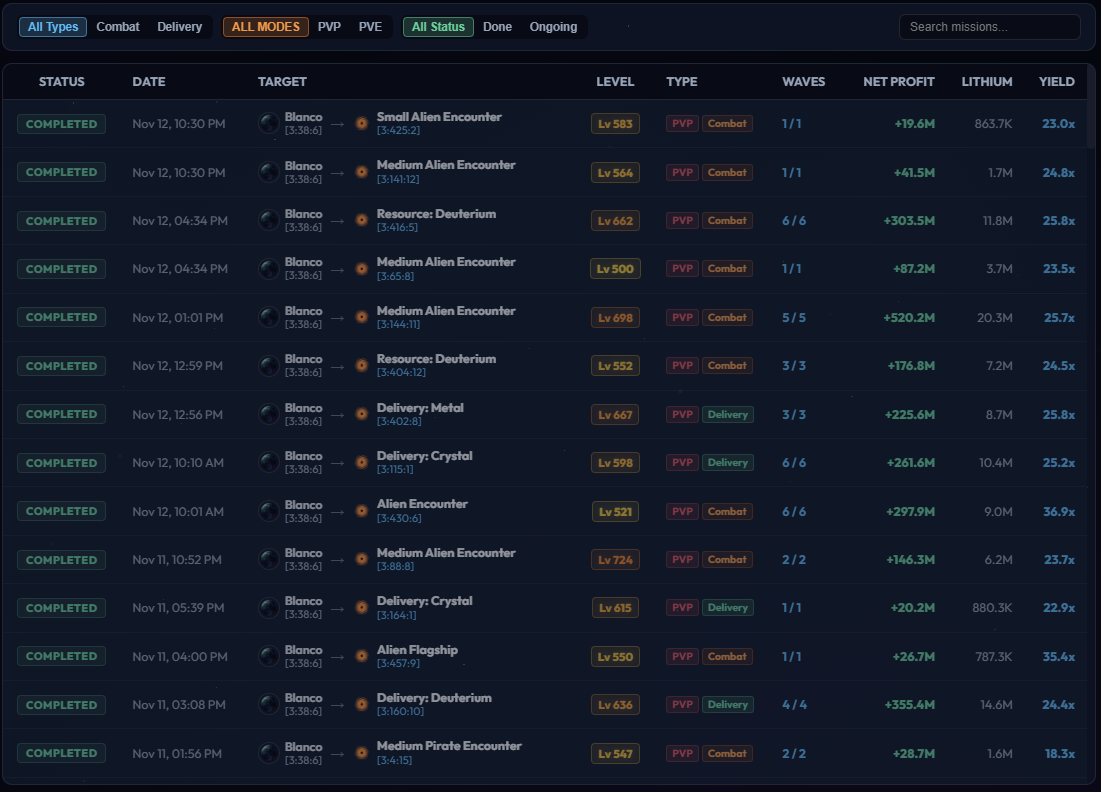
Total Resources Won Over Time
Resource Graphs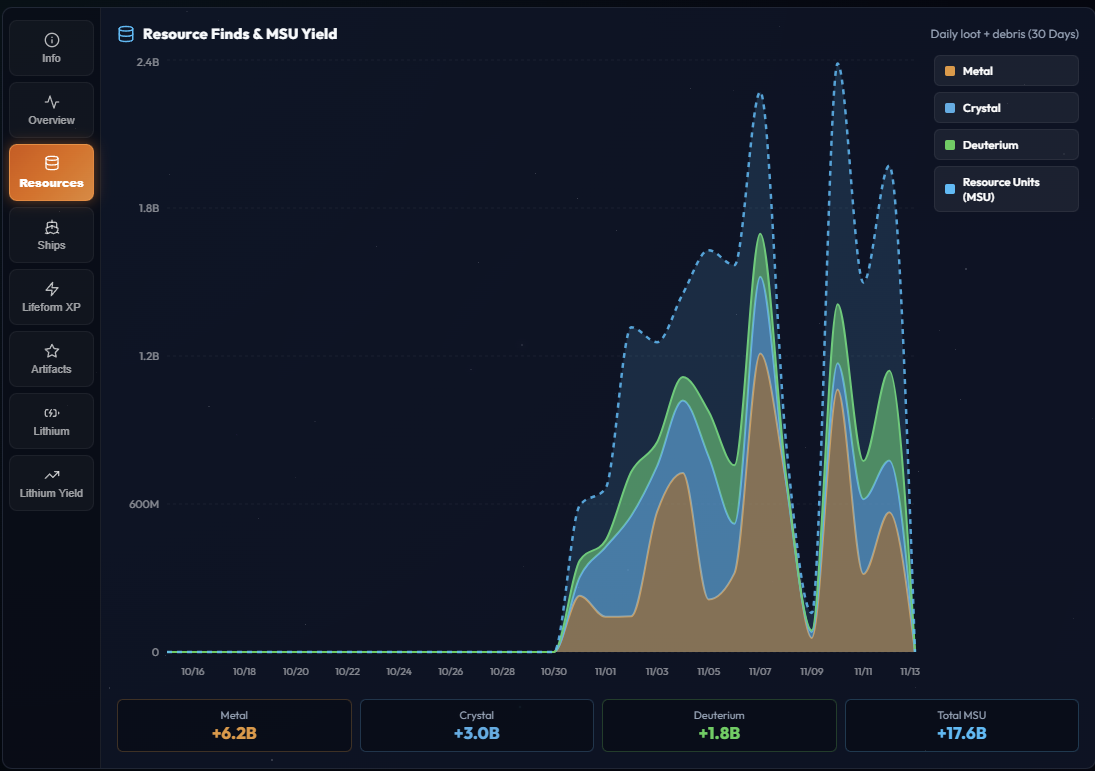
Wave-by-Wave Loot & Combat Receipts
Wave Receipts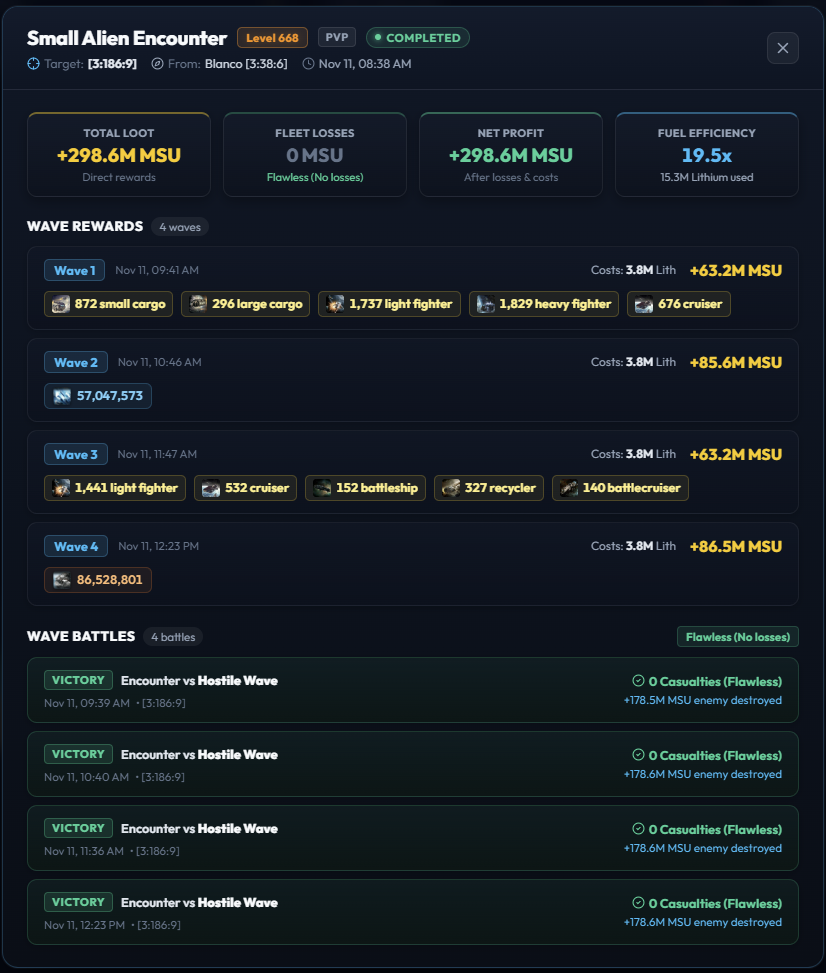
Account-Wide Facility Bonus Stacking
Empire Tracking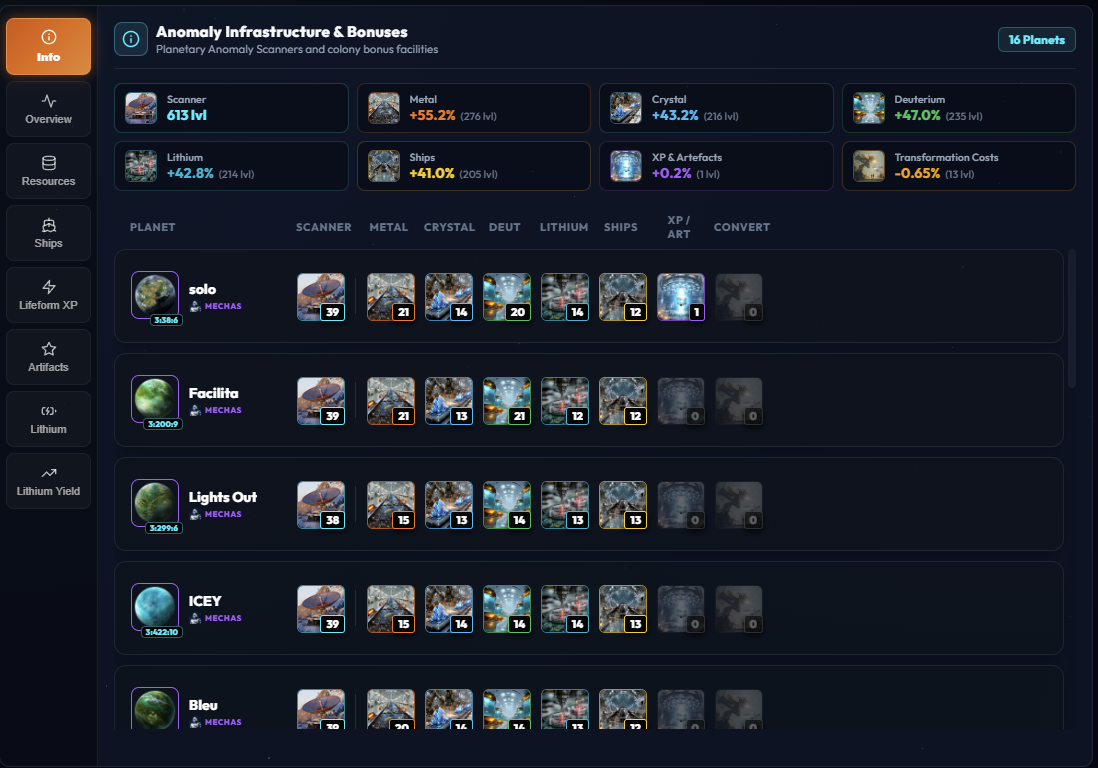
Anomaly Calculator
Simulate any deep-space anomaly in real time. Adjust your Lithium cost, mission archetype, player class, wave count, and empire bonuses to calculate exact take-home payouts, resource yields, and cargo fleet requirements:

Anomaly Mission Parameters
Sector Hazard & Player Class
Roll Quality & Empire Facilities
Reward Distribution & Facility Scaling
 Metal
0
 Crystal
0
 Deuterium
0
 Ships
0
Artifacts
 Species XP
- 1. Base Engine Constant 0.306
- 2. Lithium Fuel Spent 13,949,000 Li
- 3. Mission Archetype Multiplier 32.00x
- 4. Consecutive Wave Factor +17.6% (1.176x)
- 5. Environment & Class Multiplier 4.500x
- 6. Mission Quality Roll Factor 1.000x (High Roll)
- 7. Raw Base Budget (Pre-Bonuses) 737.32M MSU
- 8. Empire Facility Bonus Added +377.51M MSU (+51.2%)

Done Easier & Automatically with OGame Nexus
Tired of manually typing formulas, checking low-roll penalties, and sizing cargo? OGame Nexus calculates these exact numbers automatically inside your game, displaying net profit badges, recommended fleets right on your galaxy scanner cards, and more!
Quick Summary & FAQ Cheat Sheet
Fast, accurate answers to the most common questions regarding Project Orion:
• NPC Anomaly Waves: Fighting computer waves produces zero debris fields. Destroyed NPC ships and lost player warships leave no wreckage for Recyclers or Reapers to harvest.
• Player vs. Player (PvP) Attacks: If another player attacks your fleet at an anomaly, standard fleet combat rules apply. Ships destroyed in that battle do produce a standard harvestable debris field at the anomaly coordinates!